ARSA POS
ARSA POS

Point of sale for South African shops

The till that keeps selling when the internet goes down.

Start with the calculator till and Pay by QR, both free to start. When the shop grows, ARSA POS runs your stock, your staff and your cash-ups, keeps working offline through load-shedding and dropped signal, and puts the whole shop on your phone. Built by people who run shops themselves.

Finalist, FNB App of the Year 2026. Trading in South African shops since 5 October 2026, and on the Microsoft Store.

Example slip
THE CORNER STORE
Till 1 · Cashier: Thandi
Slip 004182 · 14:02

Maize meal 5kg79.99
Brown bread17.49
Cold drink 2L ×255.98
Sugar 2.5kg54.99
Matches 10pk12.00

TOTALR 220.45
VAT 15% incl.28.75
Cash250.00
Change29.55

Sold offline 14:02
Synced to cloud 14:06
OFFLINE SALE ✓ SYNCED
Calculator tillType the amount, tap a department, take the money. Free to start.
Pay by QRPayShap straight into your bank. No card machine.
Works offlineSales carry on with no signal and sync when you're back.
30 days of everythingNew shops try every feature free for a month.

Finalist

A finalist in the FNB App of the Year 2026.

Voting for the People's Choice Award is open. It closes at 18:00 (SAST) on Thursday 3 December 2026.

Vote on the App of the Year site

Start free

As quick as a calculator, and every sale is counted.

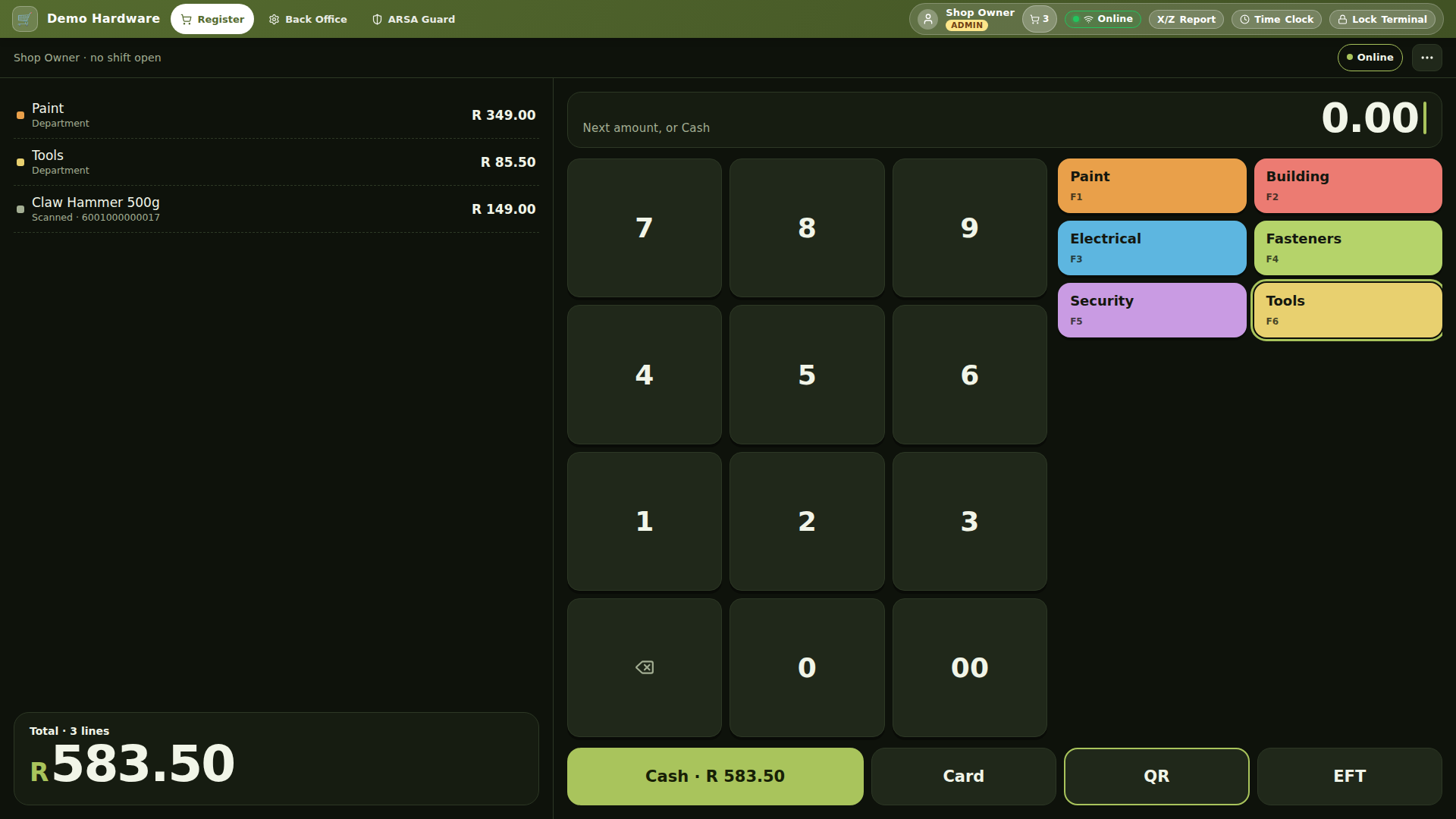
Busy at the counter? The calculator till works the way you already do: type the amount and tap the department. Scan a barcode and the item comes up by name. It is free to start, and we'll confirm its long-term price before anything is charged.

The calculator till: a sale with Paint, Tools and a scanned claw hammer, a number pad, department keys and Cash, Card, QR and EFT buttons
The calculator tillAmount, department, cash. Each department has its own colour and key, and the total stays big on the screen.
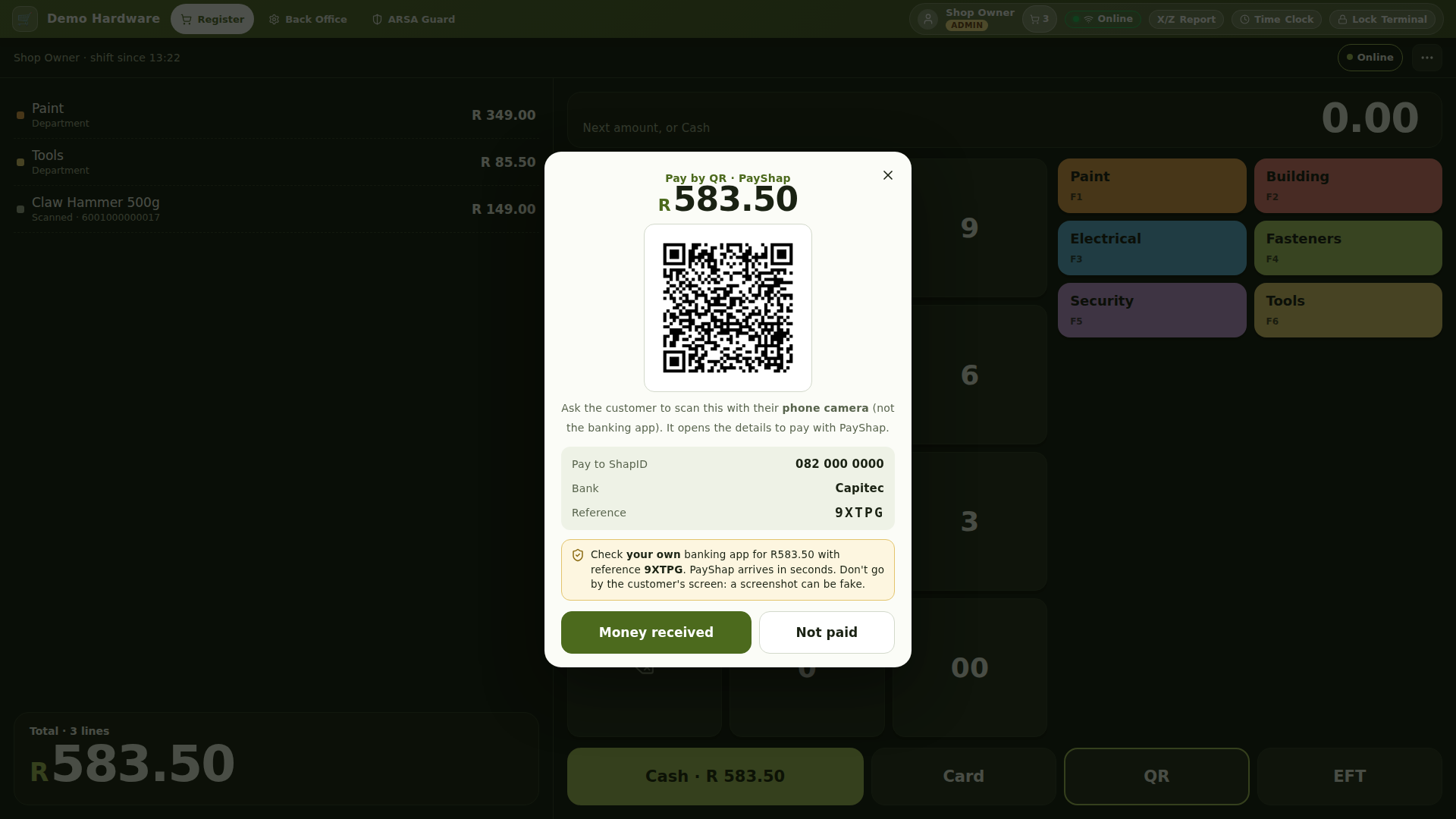
Pay by QR: the amount, a QR code to scan, the ShapID, bank and reference, and Money received and Not paid buttons
Pay by QRThe customer scans the code with their phone camera and pays with PayShap from their own banking app. The money goes into your bank account in seconds. The cashier checks your banking app, then taps Money received.

Try it

Sell, ask for a refund, approve it from your phone.

This copies the till and Director Watch screens, with demo products. Switch the Online button off first to see a sale carry on with no signal. Nothing here touches a shop's data.

1 · Sell 2 · Ask for a refund 3 · Owner decides
Demo Hardware Register Back Office ARSA Guard
Total due (VAT incl.) R0.00 VAT 15% included: R0.00

Director WatchDemo Hardware
Today R0.00 No sales yet

When the shop grows

Everything from the counter to the cash-up.

The till, the Back Office and the owner's phone share one set of products, prices and staff, so what happens at the counter shows up everywhere else.

For cashiers

Till

Three layouts: the calculator till, pictures for touch screens, and Fast scan for a scanner and keyboard, with a key for every function.

  • Cash, card, EFT, Pay by QR, store accounts and split payments
  • Lay-by, sales on hold, customer orders and exchanges
  • Refunds against the slip, with a manager's approval
  • Cash in and cash out, with a slip
  • Shifts, blind cash-ups and X/Z reports
  • Slip and label printing, cash drawer, scale
  • Training mode that never touches real sales
For managers

Back Office

Products, stock, staff and reports in one place.

  • Import your stock list from Excel or CSV
  • Price levels, specials and promotions
  • Deliveries (GRV), purchase orders and returns to suppliers
  • Stock take, also from a phone, and stock reports
  • Item enquiry and slow stock
  • Staff, roles, PINs, approval rules and override cards
  • Customer accounts with statements and a 30/60/90-day list
  • End of Day, the daily sheet and an Excel pack for your accountant
For owners

Director Watch

The shop in your pocket, wherever you are.

  • Live sales and profit, all tills together
  • ARSA Guard and Sales & Profit on your phone
  • Alerts for refunds, voids, price cuts and short cash-ups
  • Approve or decline till requests from anywhere
  • Know when a till goes offline or goes quiet
  • The daily sheet and closing the day

ARSA Guard

See where money leaks, and what to do about it today.

Most of what happens at a till is honest. ARSA Guard watches the places where theft hides, compares each person with the shop's own usual, and gives you three things to do today. It works for a one-person shop too, because it compares with your own past weeks.

Guard Today

One number, the staff side by side, and the day's to-do list.

Money lost
Stock found missing at counts, at cost, plus cash short at cash-ups, over the last 7 days.
At the till
Voids, removed lines, refunds, discounts and drawer openings without a sale, per person.
Unusual
A person's figure at twice the shop's usual for the sales they made, and big enough to matter.
Three things to do
Today's quick count first, then the biggest money: who to talk to, items to move behind the counter.

Sales & Profit

How to make more from what the till already knows.

Selling out
Items that sell with no stock left, and what each day without them costs.
Prices to check
Items sold at or below cost, and costs that went up while the price stayed the same.
Money stuck
Stock that hasn't sold in 90 days, and the cash tied up in it.
Busy times
Takings by hour and by weekday, so staff are there when the customers are.

See it working

Short clips of the real screens.

These are the same clips your staff get as training inside the app. Each shows one job, in under a minute.

At the till

Ring up a saleStart a shift, scan items, take payment. 35 seconds.
Fast scanScan, press + to pay, Enter for cash. Every button shows its key. 41 seconds.
Refund an itemRefund mode, scan the item, a manager approves. 35 seconds.

In the Back Office

Add a productName, barcode, price and stock. 36 seconds.
Import your stock listFill in the template in Excel and upload it. 32 seconds.
Receive a deliveryScan each item on the invoice, then receive. 47 seconds.
Do a stock takeScan what's on the shelf, check the differences, save the count. 41 seconds.
Cash up and close the dayCount the drawer, close the shift, then End of Day. 50 seconds.
Add a staff memberEach person gets their own role and PIN. 35 seconds.

For the owner

ARSA GuardMoney lost this week, three things to do today, and the staff side by side. 50 seconds.
Sales & ProfitWhat sold out, prices to raise, stock that doesn't move, and busy times. 48 seconds.
Make an override codeA card that approves only what you choose. 38 seconds.

Director Watch

Run the shop from your phone, even when you're not in it.

When a cashier needs a refund, a void or a price cut, the request comes to your phone. Tap approve or decline and the till carries on. See every till's sales and profit as they happen, and check the cash-up and close the day from wherever you are.

  • Live sales and profit
  • ARSA Guard, all tills
  • Remote approvals
  • Alerts you choose
  • Tills offline or quiet
  • Daily sheet and day close
?
Refund request: R 145.00Till 2 · Sipho · waiting for you
12:18
!
Cash-up short R 120.00Till 1 · afternoon shift
16:05
~
Till 2 offline for 15 minutesA shift is open · its sales are kept on the till
17:22
✓
Day closedCash-up balanced to the cent
18:32

Who it's for

Made for the shops on your street.

Free to startStreet stalls and tuckshopsThe calculator till and Pay by QR, on the phone or laptop you have.
SpazasQuick sales, cash and QR, and stock that never runs out unnoticed.
TakeawaysFast tills at the busy times, simple cash-up after.
TobacconistsSmall items, high volume, tight control on cash.
Hardware storesPrice levels, specials, deliveries, item enquiry and trade accounts.
General retailDepartments, suppliers, deliveries and reports.

Plans

Start free. Pay for what you use.

Every shop starts with 30 days of everything. The calculator till is free to start, and you choose a plan for the rest. Ask us and we'll give you a straight price for your shop.

Add to any plan

Setup, if you want it

We built ARSA POS for our own counter first. Then other shop owners asked if they could have it too.

ARSA POS comes from people who run hardware stores in South Africa. We know what a lost sale feels like when the power goes, what a short cash-up costs at the end of the day, and how hard it is to watch the shop when you can't be in it.

So we built a till that keeps selling offline, a back office that makes stock take bearable, and a phone app that lets the owner approve, check and close from anywhere. We set it up with you, in person or by phone, and we answer when you ask.

In shops right now
First outside shop goes live
ARSA POS on the Microsoft Store

Questions

Good to know before you switch.

Is the calculator till really free?

It is free to start. Every new shop gets 30 days of everything. We haven't set the long-term price of the calculator till yet, and we'll tell you before anything is charged. You pay only when you want the rest: stock, staff, cash-ups, Director Watch and so on.

How does Pay by QR work?

The till shows a QR code with the amount. The customer scans it with their phone camera and pays with PayShap from their own banking app, straight into your bank account. The cashier checks your own banking app for the money, then taps Money received. There's no card machine to rent.

What happens when the internet or power goes off?

The till keeps selling. Sales are stored on the device and sent to the cloud as soon as the connection is back. If your laptop has battery or a UPS, you can trade right through load-shedding.

What hardware do I need?

For the calculator till, the phone, tablet or laptop you already have. For the full till, a laptop or PC plus whatever you use: slip printer, barcode scanner, cash drawer, label printer or scale. If you're buying new, we'll tell you what works before you spend.

Where do I get it?

It opens in the browser and installs on the device like an app. On Windows it is also on the Microsoft Store. Director Watch installs on the owner's phone the same way.

Can I bring my existing stock list?

Yes. Fill in the Excel template and upload it, or send us your list and we'll import it, with departments, barcodes and prices.

How do my staff learn it?

Short training clips are inside the app, one for each job. The till also has a training mode where cashiers can practise without affecting real sales or stock.

What if a plan isn't paid in time?

The till keeps selling. We remind you a week before, three days before and on the day. If it stays unpaid, Director Watch, cloud backups and phone alerts stop after a few days, until it's paid.

Can I run more than one till?

Yes. Add as many tills as your counter needs. Each one can have its own printer and its own cashier's drawer.

I run a hardware store. Is it ready for me?

Yes. Price levels for trade customers, specials, deliveries with cases and average cost, item enquiry, customer accounts with statements and lay-by are all in. It is being tested in shops right now.

Start your free month.

Open ARSA POS on your device and start the free month yourself, or email us and we'll show you ARSA POS working with your products, on your hardware.